> ## Documentation Index
> Fetch the complete documentation index at: https://docs.optexity.com/llms.txt
> Use this file to discover all available pages before exploring further.
# I94 Example
> Automating I‑94 lookup and extracting data from network calls
This example shows how to automate the I‑94 recent travel history lookup and extract the result data from a **network call**, instead of scraping the page.
The automation:
* **Opens** the I‑94 site
* **Fills** the traveler details (name, nationality, DOB, document number)
* **Handles** a scroll‑to‑accept popup using a **Python script action**
* **Submits** the form and **extracts** the result from a network request
Use network call extraction pattern any time a site exposes a clean JSON API behind the UI. It
is usually simpler and more stable than DOM-based scraping. Network call extraction is faster
and more reliable than DOM scraping.
Before starting, please look at the [Local Setup](/docs/building-automations/local-setup) guide to setup the environment.
***
# Quickstart using built-in automation
You can use the built-in `i94` automation to quickly start the inference server and run the automation. The automation is available in the repository under `optexity/examples/i94.py`.
## Add automation to the dashboard
To quickly add the automation to the dashboard, you can use the following command:
```bash theme={null}
ENV_PATH=.env python optexity/examples/add_example.py --example i94
```
The `.env` file should be created in the root of the repository in the [Local Setup](/docs/building-automations/local-setup) guide. This will add the automation to your dashboard.
 ***
# Run the `i94` automation via inference
For a detailed explanation of the inference server, see the **Quickstart** guide. Below is the minimal flow to run this example.
## Start the inference server
From the project root:
```bash theme={null}
ENV_PATH=.env python optexity/inference/child_process.py --port 9000 --child_process_id 0
```
## Invoke the `i94` endpoint
You can call the `i94` automation via the `/inference` endpoint:
```bash theme={null}
curl -X POST http://localhost:9000/inference \
-H "Content-Type: application/json" \
-d '{
"endpoint_name": "i94",
"input_parameters": {
"first_name": ["John"],
"last_name": ["Doe"],
"nationality": ["IND"],
"date_of_birth": ["01/01/1990"],
"document_number": ["1234567890"]
},
"unique_parameter_names": []
}'
```
While the request runs, the browser will execute the steps on your behalf. When the run finishes, you can:
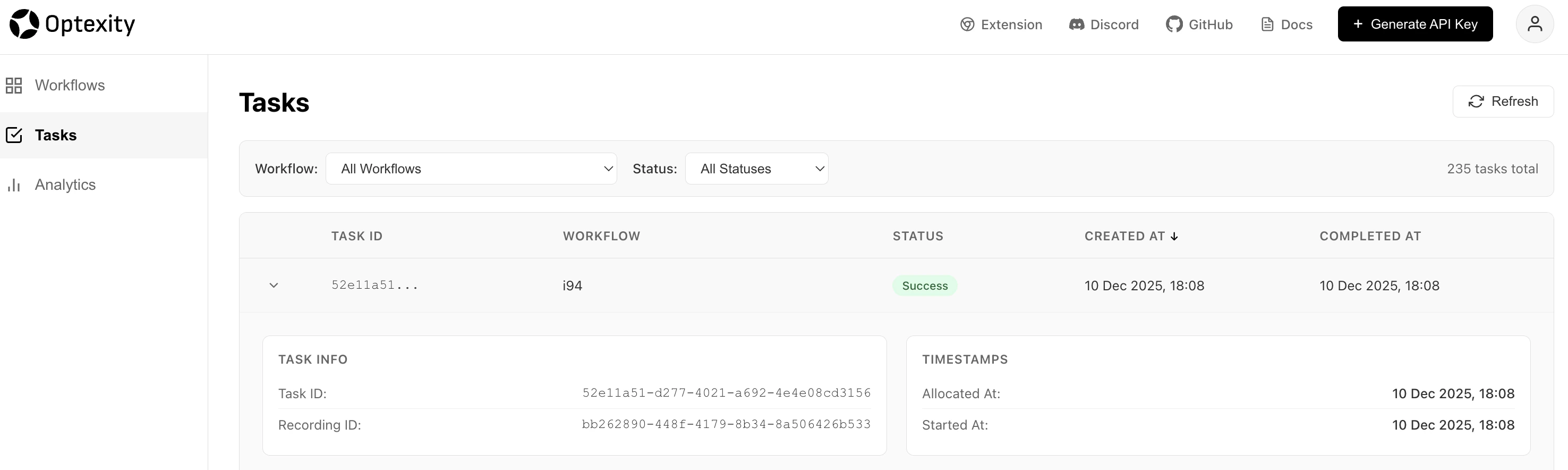
* Inspect the **task run** and **extracted data** in the dashboard
* Re‑use the extracted JSON in downstream systems
## Viewing the task run
You can view the task run in the [https://dashboard.optexity.com](https://dashboard.optexity.com). The task run will show the steps that were executed and the extracted data.
***
# Run the `i94` automation via inference
For a detailed explanation of the inference server, see the **Quickstart** guide. Below is the minimal flow to run this example.
## Start the inference server
From the project root:
```bash theme={null}
ENV_PATH=.env python optexity/inference/child_process.py --port 9000 --child_process_id 0
```
## Invoke the `i94` endpoint
You can call the `i94` automation via the `/inference` endpoint:
```bash theme={null}
curl -X POST http://localhost:9000/inference \
-H "Content-Type: application/json" \
-d '{
"endpoint_name": "i94",
"input_parameters": {
"first_name": ["John"],
"last_name": ["Doe"],
"nationality": ["IND"],
"date_of_birth": ["01/01/1990"],
"document_number": ["1234567890"]
},
"unique_parameter_names": []
}'
```
While the request runs, the browser will execute the steps on your behalf. When the run finishes, you can:
* Inspect the **task run** and **extracted data** in the dashboard
* Re‑use the extracted JSON in downstream systems
## Viewing the task run
You can view the task run in the [https://dashboard.optexity.com](https://dashboard.optexity.com). The task run will show the steps that were executed and the extracted data.
 ***
# I94 Travel History
A similar automation is available for retrieving full travel history instead of just recent travel records. The `get_i94_travel_history` automation follows the same pattern but uses different endpoints:
* **URL**: `https://i94.cbp.dhs.gov/search/history-search`
* **Network extraction**: `https://i94.cbp.dhs.gov/api/services/travel/history`
## Add automation to the dashboard
```bash theme={null}
ENV_PATH=.env python optexity/examples/add_example.py --example get_i94_travel_history
```
## Invoke the `get_i94_travel_history` endpoint
```bash theme={null}
curl -X POST http://localhost:9000/inference \
-H "Content-Type: application/json" \
-d '{
"endpoint_name": "get_i94_travel_history",
"input_parameters": {
"first_name": ["John"],
"last_name": ["Doe"],
"nationality": ["IND"],
"date_of_birth": ["01/01/1990"],
"document_number": ["1234567890"]
},
"unique_parameter_names": []
}'
```
The automation structure is identical to the recent search example, with only the URL and network call pattern differing. The full Python definition lives in `optexity/examples/i94_travel_history.py`.
***
# Build the automation from scratch
## Record the base workflow
1. Go to the I‑94 site and **record** a workflow that:
* Navigates to the recent‑search page
* Fills in first name, last name, nationality, date of birth, and document number
* Submits the form and waits for the result
2. After saving, you will see an `i94` automation in your dashboard that contains only the **interaction actions** (clicks, fills, selects).
We have also built this automation by default and you can find it in your dashboard.
***
## Refine the automation
Recording captures clicks and inputs, but you still need to:
* **Tighten** some interaction instructions
* **Add** a network‑call extraction action
* **Add** a Python script to handle the scroll‑to‑accept popup
### Clarify the nationality selection
In the recorded flow, the nationality selection might not have a precise locator. You can let the model drive the selection using **`prompt_instructions`**:
```json theme={null}
{
"end_sleep_time": 1,
"interaction_action": {
"click_element": {
"prompt_instructions": "Select {nationality[0]} from the options. Be careful to select the correct option, which will be of the format `nationality (code)`."
}
}
}
```
If a `command` is not provided, Optexity uses `prompt_instructions` to decide how to perform the action.
### Add a network‑call extraction action
To capture the I‑94 result, add an `extraction_action` that listens for the specific network call:
```json theme={null}
{
"before_sleep_time": 3,
"end_sleep_time": 0,
"extraction_action": {
"network_call": {
"url_pattern": "https://i94.cbp.dhs.gov/api/services/i94/recent"
}
}
}
```
This action waits for the matching network request and returns its JSON payload as structured extracted data.
> **Tip**: If extraction does not fire, verify the `url_pattern` in your browser devtools Network tab and make the pattern as specific as needed (path + query if required).
### Scroll the popup via Python script
The I‑94 site requires scrolling inside a popup before the **“I ACKNOWLEDGE AND AGREE”** button becomes clickable. Use a `python_script_action` to scroll the popup content:
```json theme={null}
{
"end_sleep_time": 1,
"python_script_action": {
"execution_code": "async def code_fn(page):\n print(\"entering code_fn\")\n await page.evaluate(\n \"\"\" const el = document.querySelector('mat-dialog-content'); if (el) el.scrollTop = el.scrollHeight;\"\"\"\n )\n print(\"exiting code_fn\")\n"
}
}
```
The full Python definition for this automation lives in `optexity/examples/i94.py`. You can also use the optexity dashboard to edit the automation and save it as a new automation.
> **Note**: Script actions run in the same browser context as the page. They are ideal for edge cases like scrolling a specific container, dismissing tricky popups, or calling custom JS helpers.
***
# Final Automation
```json theme={null}
{
"url": "https://i94.cbp.dhs.gov/search/recent-search",
"nodes": [
{
"end_sleep_time": 1,
"before_sleep_time": 3,
"python_script_action": {
"execution_code": "async def code_fn(page):\n print(\"entering code_fn\")\n await page.evaluate(\n \"\"\" const el = document.querySelector('mat-dialog-content'); if (el) el.scrollTop = el.scrollHeight;\"\"\"\n )\n print(\"exiting code_fn\")\n"
}
},
{
"end_sleep_time": 1,
"interaction_action": {
"click_element": {
"command": "get_by_role(\"button\", name=\"I ACKNOWLEDGE AND AGREE\")",
"prompt_instructions": "Click the I ACKNOWLEDGE AND AGREE button"
}
}
},
{
"end_sleep_time": 1,
"interaction_action": {
"input_text": {
"command": "get_by_role(\"textbox\", name=\"Please enter your first name\")",
"input_text": "{first_name[0]}",
"prompt_instructions": "Enter the First Name"
}
}
},
{
"end_sleep_time": 1,
"interaction_action": {
"input_text": {
"command": "get_by_role(\"textbox\", name=\"Please enter your last name\")",
"input_text": "{last_name[0]}",
"prompt_instructions": "Enter the Last Name"
}
}
},
{
"end_sleep_time": 1,
"interaction_action": {
"input_text": {
"command": "get_by_role(\"textbox\", name=\"Date of Birth\")",
"input_text": "{date_of_birth[0]}",
"prompt_instructions": "Enter the Date of Birth"
}
}
},
{
"end_sleep_time": 1,
"interaction_action": {
"input_text": {
"command": "get_by_role(\"textbox\", name=\"Please enter your document\")",
"input_text": "{document_number[0]}",
"prompt_instructions": "Enter the Document Number"
}
}
},
{
"end_sleep_time": 1,
"interaction_action": {
"input_text": {
"command": "get_by_role(\"combobox\", name=\"Please enter your document\")",
"input_text": "{nationality[0]}",
"prompt_instructions": "Enter the Nationality"
}
}
},
{
"end_sleep_time": 1,
"interaction_action": {
"click_element": {
"prompt_instructions": "Select {nationality[0]} from the options. Be careful to select the correct option. which will be of the format `nationality (code)`"
}
}
},
{
"end_sleep_time": 1,
"interaction_action": {
"click_element": {
"command": "get_by_role(\"button\", name=\"Click to submit the form\")",
"prompt_instructions": "Click the Submit button"
}
}
},
{
"end_sleep_time": 0,
"before_sleep_time": 3,
"extraction_action": {
"network_call": {
"url_pattern": "https://i94.cbp.dhs.gov/api/services/i94/recent",
"extract_from": "response",
"download_filename": "185dfa24-7d2c-40d2-9f39-2515976e59a4"
}
}
}
],
"parameters": {
"input_parameters": {
"last_name": ["Last Name"],
"first_name": ["First Name"],
"nationality": ["IND"],
"date_of_birth": ["MM/DD/YYYY"],
"document_number": ["Document Number"]
},
"generated_parameters": {}
},
"browser_channel": "chrome"
}
```
***
# I94 Travel History
A similar automation is available for retrieving full travel history instead of just recent travel records. The `get_i94_travel_history` automation follows the same pattern but uses different endpoints:
* **URL**: `https://i94.cbp.dhs.gov/search/history-search`
* **Network extraction**: `https://i94.cbp.dhs.gov/api/services/travel/history`
## Add automation to the dashboard
```bash theme={null}
ENV_PATH=.env python optexity/examples/add_example.py --example get_i94_travel_history
```
## Invoke the `get_i94_travel_history` endpoint
```bash theme={null}
curl -X POST http://localhost:9000/inference \
-H "Content-Type: application/json" \
-d '{
"endpoint_name": "get_i94_travel_history",
"input_parameters": {
"first_name": ["John"],
"last_name": ["Doe"],
"nationality": ["IND"],
"date_of_birth": ["01/01/1990"],
"document_number": ["1234567890"]
},
"unique_parameter_names": []
}'
```
The automation structure is identical to the recent search example, with only the URL and network call pattern differing. The full Python definition lives in `optexity/examples/i94_travel_history.py`.
***
# Build the automation from scratch
## Record the base workflow
1. Go to the I‑94 site and **record** a workflow that:
* Navigates to the recent‑search page
* Fills in first name, last name, nationality, date of birth, and document number
* Submits the form and waits for the result
2. After saving, you will see an `i94` automation in your dashboard that contains only the **interaction actions** (clicks, fills, selects).
We have also built this automation by default and you can find it in your dashboard.
***
## Refine the automation
Recording captures clicks and inputs, but you still need to:
* **Tighten** some interaction instructions
* **Add** a network‑call extraction action
* **Add** a Python script to handle the scroll‑to‑accept popup
### Clarify the nationality selection
In the recorded flow, the nationality selection might not have a precise locator. You can let the model drive the selection using **`prompt_instructions`**:
```json theme={null}
{
"end_sleep_time": 1,
"interaction_action": {
"click_element": {
"prompt_instructions": "Select {nationality[0]} from the options. Be careful to select the correct option, which will be of the format `nationality (code)`."
}
}
}
```
If a `command` is not provided, Optexity uses `prompt_instructions` to decide how to perform the action.
### Add a network‑call extraction action
To capture the I‑94 result, add an `extraction_action` that listens for the specific network call:
```json theme={null}
{
"before_sleep_time": 3,
"end_sleep_time": 0,
"extraction_action": {
"network_call": {
"url_pattern": "https://i94.cbp.dhs.gov/api/services/i94/recent"
}
}
}
```
This action waits for the matching network request and returns its JSON payload as structured extracted data.
> **Tip**: If extraction does not fire, verify the `url_pattern` in your browser devtools Network tab and make the pattern as specific as needed (path + query if required).
### Scroll the popup via Python script
The I‑94 site requires scrolling inside a popup before the **“I ACKNOWLEDGE AND AGREE”** button becomes clickable. Use a `python_script_action` to scroll the popup content:
```json theme={null}
{
"end_sleep_time": 1,
"python_script_action": {
"execution_code": "async def code_fn(page):\n print(\"entering code_fn\")\n await page.evaluate(\n \"\"\" const el = document.querySelector('mat-dialog-content'); if (el) el.scrollTop = el.scrollHeight;\"\"\"\n )\n print(\"exiting code_fn\")\n"
}
}
```
The full Python definition for this automation lives in `optexity/examples/i94.py`. You can also use the optexity dashboard to edit the automation and save it as a new automation.
> **Note**: Script actions run in the same browser context as the page. They are ideal for edge cases like scrolling a specific container, dismissing tricky popups, or calling custom JS helpers.
***
# Final Automation
```json theme={null}
{
"url": "https://i94.cbp.dhs.gov/search/recent-search",
"nodes": [
{
"end_sleep_time": 1,
"before_sleep_time": 3,
"python_script_action": {
"execution_code": "async def code_fn(page):\n print(\"entering code_fn\")\n await page.evaluate(\n \"\"\" const el = document.querySelector('mat-dialog-content'); if (el) el.scrollTop = el.scrollHeight;\"\"\"\n )\n print(\"exiting code_fn\")\n"
}
},
{
"end_sleep_time": 1,
"interaction_action": {
"click_element": {
"command": "get_by_role(\"button\", name=\"I ACKNOWLEDGE AND AGREE\")",
"prompt_instructions": "Click the I ACKNOWLEDGE AND AGREE button"
}
}
},
{
"end_sleep_time": 1,
"interaction_action": {
"input_text": {
"command": "get_by_role(\"textbox\", name=\"Please enter your first name\")",
"input_text": "{first_name[0]}",
"prompt_instructions": "Enter the First Name"
}
}
},
{
"end_sleep_time": 1,
"interaction_action": {
"input_text": {
"command": "get_by_role(\"textbox\", name=\"Please enter your last name\")",
"input_text": "{last_name[0]}",
"prompt_instructions": "Enter the Last Name"
}
}
},
{
"end_sleep_time": 1,
"interaction_action": {
"input_text": {
"command": "get_by_role(\"textbox\", name=\"Date of Birth\")",
"input_text": "{date_of_birth[0]}",
"prompt_instructions": "Enter the Date of Birth"
}
}
},
{
"end_sleep_time": 1,
"interaction_action": {
"input_text": {
"command": "get_by_role(\"textbox\", name=\"Please enter your document\")",
"input_text": "{document_number[0]}",
"prompt_instructions": "Enter the Document Number"
}
}
},
{
"end_sleep_time": 1,
"interaction_action": {
"input_text": {
"command": "get_by_role(\"combobox\", name=\"Please enter your document\")",
"input_text": "{nationality[0]}",
"prompt_instructions": "Enter the Nationality"
}
}
},
{
"end_sleep_time": 1,
"interaction_action": {
"click_element": {
"prompt_instructions": "Select {nationality[0]} from the options. Be careful to select the correct option. which will be of the format `nationality (code)`"
}
}
},
{
"end_sleep_time": 1,
"interaction_action": {
"click_element": {
"command": "get_by_role(\"button\", name=\"Click to submit the form\")",
"prompt_instructions": "Click the Submit button"
}
}
},
{
"end_sleep_time": 0,
"before_sleep_time": 3,
"extraction_action": {
"network_call": {
"url_pattern": "https://i94.cbp.dhs.gov/api/services/i94/recent",
"extract_from": "response",
"download_filename": "185dfa24-7d2c-40d2-9f39-2515976e59a4"
}
}
}
],
"parameters": {
"input_parameters": {
"last_name": ["Last Name"],
"first_name": ["First Name"],
"nationality": ["IND"],
"date_of_birth": ["MM/DD/YYYY"],
"document_number": ["Document Number"]
},
"generated_parameters": {}
},
"browser_channel": "chrome"
}
```